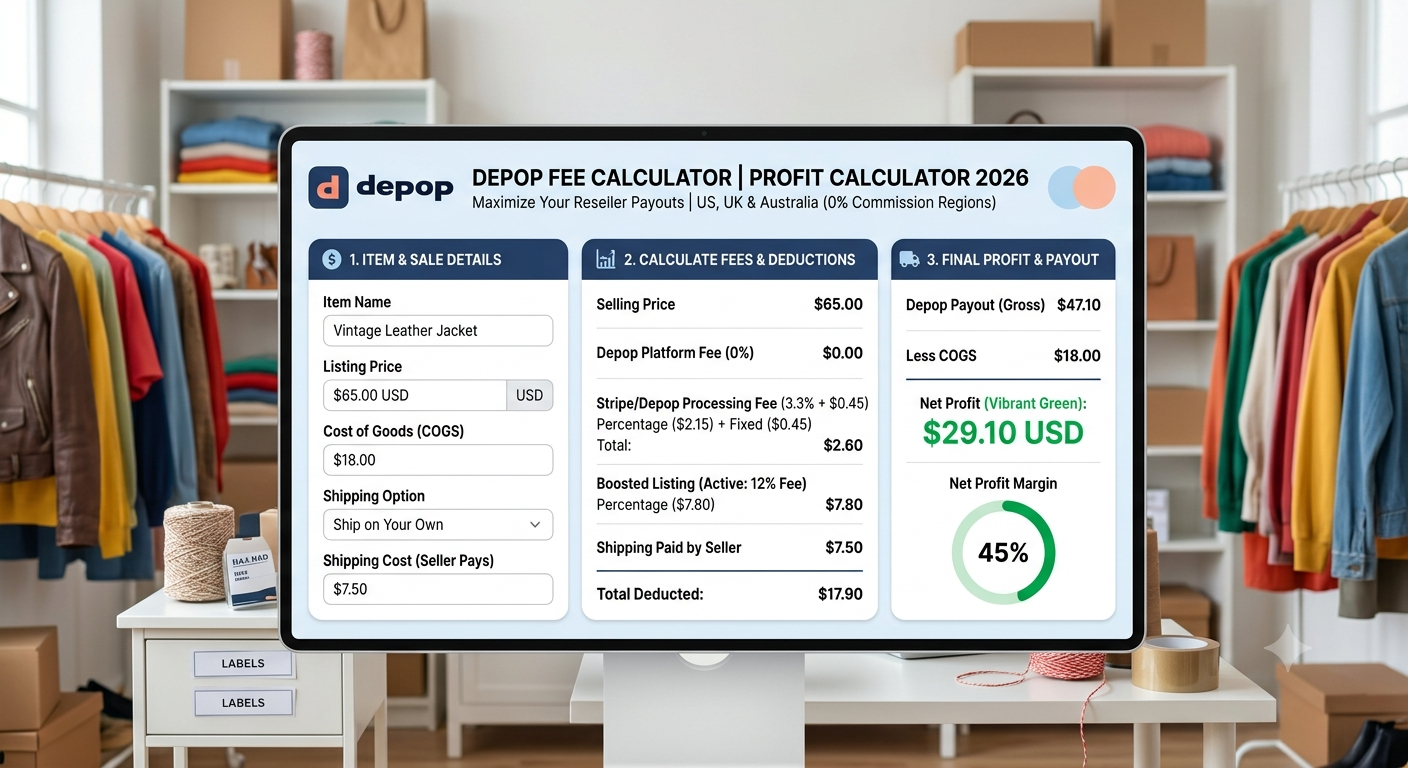
Depop Fee Calculator
| Cost / Revenue Line Item | Amount ($) |
|---|---|
| Listing Price | $0.00 |
| Depop Selling Fee | $0.00 |
| Payment Processing Fee | -$0.00 |
| Boosted Listing Fee | $0.00 |
| Outbound Shipping Cost | $0.00 |
| Item COGS & Supplies | -$0.00 |
| Net Seller Profit | $0.00 |
| Profit Margin | 0.00% |
The Ultimate Guide to the Depop Fee Calculator: Master Your Real Profit Margins in 2026-2027
Social commerce and vintage resale have revolutionized modern ecommerce, turning platforms like Depop into multi-million-dollar marketplaces for fashion curators, Gen-Z thrifters, and indie brand owners. However, while opening a storefront on Depop is completely free, running a sustainable resale business requires using a depop fee calculator to gain a granular understanding of the platform’s cost structures. What seems like a straightforward sale on paper can quickly contract once payment processing costs, boosted listing commissions, shipping label fees, and cross-border currency surcharges are deducted.
In 2024 and through 2026, Depop rolled out major marketplace structural shifts—most notably removing its legacy 10% platform commission for sellers in the United States, United Kingdom, and Australia, while shifting marketplace fees onto buyers and maintaining traditional commission structures for international sellers. To navigate these evolving financial dynamics without making costly miscalculations, sellers must rely on an up-to-date depop fee calculator.
Whether you are pricing rare vintage clothing, flipping designer streetwear, or clearing out your personal wardrobe, taking advantage of a dedicated depop fee calculator ensures that you never miscalculate your net payout. This comprehensive guide breaks down the exact mathematical formulas, platform policies, regional transaction fees, advertising boost costs, and strategic pricing models required to maximize your bottom-line profits on Depop in 2026.
Why Every Reseller Needs a Depop Fee Calculator
Many online sellers make the mistake of setting item prices based solely on what they originally paid for an item (Cost of Goods Sold or COGS) plus a simple percentage markup. Unfortunately, online marketplaces involve multi-tiered cost structures that eat into revenue. Without an automated depop fee calculator, you risk selling inventory at a break-even rate—or even worse, taking a net loss after accounting for shipping packaging and transaction overhead.
1. The Impact of Payment Processing Overhead
Even in regions where Depop charges a 0% platform commission to sellers, financial intermediaries like Stripe (powering Depop Payments) or PayPal still levy payment processing charges. Evaluating your sales with a depop fee calculator shows how these processing fees consist of a variable percentage combined with a fixed dollar or penny charge on the total transaction value (which includes the item price, buyer-paid shipping, and sales tax). On lower-priced items (such as a $15 graphic tee), fixed transaction fees can consume a surprisingly large percentage of your gross earnings.
2. Boosted Listing Attribution
Depop offers an internal promotional tool called Boosted Listings, which increases item visibility across buyer feed algorithms. When an item sells through a boosted placement within a 28-day window, Depop charges an additional promotional fee (typically 8% to 12% depending on the listing date and region). A robust depop fee calculator helps you evaluate whether the extra sales velocity gained from boosting justifies the reduced profit margin.
3. Shipping Options & Tiered Cost Absorption
Sellers can choose between two primary shipping models:
-
Ship with Depop (where the buyer or seller pays for a pre-paid marketplace shipping label).
-
Ship on Your Own (where the seller handles logistics independently and includes shipping costs in the item price or charges a separate fee).
Modeling each shipping approach inside a depop fee calculator prevents hidden logistics expenses from wiping out your net margin.
[ez-toc]
How the Depop Fee Engine Works: Core Mathematical Formulas
To properly calculate depop fees, using a depop fee calculator requires understanding how marketplace payment flows operate. Depop operates on a gross transaction model where processing fees apply to the entire customer payment, while advertising and commission fees apply to the item price (and seller-handled shipping).
1. The Master Net Profit Formula
Below is the foundational equation every depop fee calculator uses to determine your final earnings:
Where:
-
Selling Price: The listed purchase price of the item.
-
COGS (Cost of Goods Sold): What you paid to acquire the item.
-
Depop Commission: $0$ for US, UK, and AUS sellers; $10\%$ of $(\text{Item Price} + \text{Seller Shipping})$ for international sellers.
-
Payment Processing Fee: $(\text{Total Transaction Amount} \times \text{Processing Rate \%}) + \text{Fixed Transaction Fee}$.
-
Boost Fee (Optional): Item Price $\times$ Boost Rate ($8\%$ or $12\%$).
2. Bank Payout vs. Net Profit in a Depop Fee Calculator
It is vital to distinguish between your Depop Bank Payout (the funds deposited into your checking account) and your Net Profit (the actual money you keep after accounting for initial item acquisition and shipping supplies). A full-featured depop fee calculator separates these two figures:
-
Depop Bank Payout = $\text{Total Buyer Payment} – \text{Depop Commission} – \text{Payment Processing Fee} – \text{Boost Fee} – \text{Depop Shipping Label Cost}$
-
Net Final Profit = $\text{Depop Bank Payout} – \text{COGS} – \text{Independent Shipping Label Costs} – \text{Packaging Supplies}$
2026 Depop Seller Fee Structure Breakdown Matrix
Marketplace fee policies differ significantly based on the seller’s country, currency, payment provider, and advertising selections. An accurate depop fee calculator adjusts its backend calculations according to the parameters detailed in the updated master structure matrix for 2026:
Regional Fee Structure Matrix
| Seller Location | Depop Platform Fee | Depop Payments Processing Rate | Fixed Transaction Charge | Optional Boost Fee |
| United States (USD) | 0% | 3.3% | $0.45 | 12% (New) / 8% (Legacy) |
| United Kingdom (GBP) | 0% | 2.9% | £0.30 | 12% (New) / 8% (Legacy) |
| Australia (AUD) | 0% | 2.6% | $0.30 AUD | 8% |
| Canada (CAD / PayPal) | 10% | Varies via PayPal (~3.7%–5.4%) | ~$0.30 CAD | 8% |
| European Union (EUR) | 10% | Varies via PayPal + 1.29% UK-EU Service | Varies | 8% |
| Rest of World | 10% | Standard PayPal Cross-Border Rate | Standard PayPal Fixed | 8% |
Detailed Breakdown of Depop Fee Components
To master using a depop seller fees calculator, let’s analyze each fee component individually.
       +-------------------------------------------------------+
       |                 GROSS BUYER PAYMENT                   |
       |     (Item Selling Price + Shipping + Sales Tax)       |
       +-------------------------------------------------------+
                                   |
                  +----------------+----------------+
                  |                                 |
                  v                                 v
   +------------------------------+  +------------------------------+
   |    PLATFORM DEDUCTIONS       |  |     SELLER GROSS PAYOUT      |
   |  • Depop Commission (0%/10%) |  |  Remaining Balance in Bank   |
   |  • Processing (3.3%+$0.45)   |  +------------------------------+
   |  • Boost Fee (8% - 12%)      |                 |
   |  • Depop Label (if seller pd)|                 v
   +------------------------------+  +------------------------------+
                                     |      SELLER NET PROFIT       |
                                     |   Gross Payout - COGS -      |
                                     |   Packaging & Self Shipping   |
                                     +------------------------------+
1. Depop Selling Fee (Platform Commission)
-
US, UK, and AUS Sellers: Following Depop’s major policy shifts, there is 0% selling commission charged on listings. Depop shifted monetization by charging buyers a small Marketplace / Buyer Protection fee (up to 5% + fixed charge). This makes Depop one of the most competitive platforms for sellers in these regions.
-
International Sellers: Sellers located outside the US, UK, and Australia still pay a 10% marketplace commission. Plugging your international listing values into a depop fee calculator helps quickly model how this fee is calculated on the total sales amount (item price plus seller-provided shipping charges, excluding automated sales taxes).
2. Payment Processing Fees (Depop Payments / Stripe)
All transactions handled through Depop Payments undergo automated payment processing via Stripe. Inputting total buyer payments into a depop fee calculator helps track these Stripe deductions:
-
In the United States, the processing fee is 3.3% + $0.45 per transaction.
-
In the United Kingdom, the rate is 2.9% + £0.30 per transaction.
-
In Australia, the rate is 2.6% + $0.30 AUD.
Note on Tax & Processing: When buyers pay state sales tax (which Depop automatically collects and remits), the payment processor charges the percentage rate on the total order value including tax. However, the fixed fee ($0.45 or £0.30) is applied only once per order.
3. Boosted Listings Advertising Fee
Sellers who toggle on Boosted Listings place their items in curated search slots.
-
If a buyer views, clicks, or likes a boosted item and purchases it within 28 days, Depop levies a Boost Fee (12% for newer listings in major markets, or 8% in standard markets).
-
The boost fee is charged on the item sale price (and seller shipping if not using Depop labels), but excluding tax.
-
If an item sells organically without a buyer interacting with the boosted placement, no boost fee is charged.
4. Shipping Fees & Logistics Models
Shipping on Depop can be handled in two ways:
-
Ship with Depop (Marketplace Prepaid Label): Depop generates a trackable shipping label via USPS, Evri, or Royal Mail. You can choose whether the buyer pays for this label during checkout or if you offer free shipping and pay for the label out of your sale proceeds.
-
Ship on Your Own (Self-Shipping): You arrange shipping via a third-party carrier (e.g., Pirateship, Shippo). You set a custom shipping price. Utilizing a depop fee calculator helps you assess how adding custom shipping charges into your gross transaction payout affects overall processing fees.
Step-by-Step Practical Examples: Manual vs. Calculator Math
To visualize how a depop fee calculator works, let’s run through realistic step-by-step calculations across different seller scenarios.
Scenario A: US Seller – Standard Sale (No Boost)
-
Item: Vintage Y2K Leather Jacket
-
Selling Price: $60.00
-
Shipping: Buyer pays $8.00 (Ship with Depop prepaid label)
-
COGS: $15.00
-
Packaging Materials: $1.50
-
Sales Tax (Estimated 7% paid by buyer): $4.26
-
Total Gross Transaction Value: $60.00 + $8.00 + $4.26 = $72.26
Fee Calculation Steps:
-
Depop Platform Selling Fee: $0.00 (US 0% promo rate)
-
Depop Payment Processing Fee (3.3% + $0.45):
$$\text{Processing Fee} = (\$72.26 \times 0.033) + \$0.45 = \$2.38 + \$0.45 = \$2.83$$ -
Boost Fee: $0.00 (Not boosted)
-
Depop Label Cost: Deducted directly from buyer payment (Seller balance isn’t charged for buyer-paid labels).
Financial Summary:
-
Gross Buyer Payment: $72.26
-
Less Sales Tax Remitted by Depop: -$4.26
-
Less Buyer Shipping Paid to Carrier: -$8.00
-
Less Payment Processing Fee: -$2.83
-
Net Depop Bank Payout: $57.17
-
Less COGS ($15.00) & Packaging ($1.50): -$16.50
-
Final Net Profit: $40.67
-
Net Profit Margin: $(\$40.67 / \$60.00) \times 100 =$ 67.78%
Scenario B: US Seller – Boosted Sale (12% Boost Rate)
Taking the exact same item, but assuming it sold through a Boosted Listing:
Additional Fee Steps:
-
Boosted Listing Fee (12% of Item Price):
$$\text{Boost Fee} = \$60.00 \times 0.12 = \$7.20$$ -
Payment Processing Fee: $2.83 (Unchanged)
Financial Summary:
-
Net Depop Bank Payout: $\$57.17 – \$7.20 =$ $49.97
-
Less COGS & Packaging: -$16.50
-
Final Net Profit: $33.47
-
Net Profit Margin: $(\$33.47 / \$60.00) \times 100 =$ 55.78%
Takeaway: Boosting reduced the net profit by $7.20 (a ~12% drop in margin). Running these variations through a depop fee calculator allows you to see if the increased cash flow velocity justifies the promotional cost.
Scenario C: International Seller (Canada/EU) – 10% Platform Fee + PayPal Processing
-
Item: Streetwear Hoodie
-
Selling Price: $50.00 CAD
-
Shipping: Seller offers “Free Shipping” (Self-shipping actual cost = $12.00 CAD)
-
COGS: $10.00 CAD
-
Location: Canada (PayPal payment)
Fee Calculation Steps:
-
Depop Selling Fee (10% of Selling Price + Seller Shipping):
$$\text{Depop Commission} = \$50.00 \times 0.10 = \$5.00\text{ CAD}$$ -
PayPal Processing Fee (Estimated 3.7% + $0.30 CAD):
$$\text{PayPal Fee} = (\$50.00 \times 0.037) + \$0.30 = \$1.85 + \$0.30 = \$2.15\text{ CAD}$$
Financial Summary:
-
Gross Buyer Payment: $50.00 CAD
-
Less Depop Commission (10%): -$5.00 CAD
-
Less PayPal Processing Fee: -$2.15 CAD
-
Net Depop Payout: $42.85 CAD
-
Less Out-of-Pocket Shipping: -$12.00 CAD
-
Less COGS: -$10.00 CAD
-
Final Net Profit: $20.85 CAD
-
Net Profit Margin: $(\$20.85 / \$50.00) \times 100 =$ 41.70%
Scenario Comparison Table
To help you compare earnings across pricing levels and listing strategies, the following table illustrates four seller profiles using an automated depop fee calculator model.
| Cost Breakdown Item | Scenario A: US Standard ($30 Item) | Scenario B: US Boosted ($75 Item) | Scenario C: UK Standard (£40 Item) | Scenario D: Non-US/UK 10% Fee ($50 Item) |
| Retail Listed Selling Price | $30.00 | $75.00 | £40.00 | $50.00 |
| Buyer-Paid Shipping | $5.50 | $8.00 | £3.50 | $0.00 (Free Ship) |
| Estimated Tax (Remitted) | $2.10 | $5.25 | £0.00 (VAT Incl.) | $0.00 |
| Gross Order Value | $37.60 | $88.25 | £43.50 | $50.00 |
| Depop Platform Commission | $0.00 (0%) | $0.00 (0%) | £0.00 (0%) | $5.00 (10%) |
| Payment Processing Fee | $1.69 | $3.36 | £1.56 | $2.15 |
| Boosted Listing Fee | $0.00 | $9.00 (12%) | £0.00 | $0.00 |
| Self-Shipping Carrier Cost | $0.00 (Prepaid) | $0.00 (Prepaid) | £0.00 (Prepaid) | $10.00 |
| Item COGS | $6.00 | $20.00 | £8.00 | $12.00 |
| Net Depop Bank Payout | $28.31 | $62.64 | £38.44 | $42.85 |
| Net Final Profit | $22.31 | $42.64 | £30.44 | $20.85 |
| Gross Profit Margin (%) | 74.37% | 56.85% | 76.10% | 41.70% |
Strategic Pricing Models for Depop Sellers
Understanding how to use a depop fee calculator allows you to move from reactive listing to proactive pricing strategies. Here are four actionable tactics to optimize your profit margins.
+-------------------------------------------------------------------+
|                   PROFIT MARGIN STRATEGY TRIANGLE                  |
|                                                                   |
|                       [ 1. Reverse Pricing ]                      |
|                     Work backward from target                     |
|                           net profit                              |
|                                /\                                 |
|                               /  \                                |
|                              /    \                               |
|                             /      \                              |
|                            /        \                             |
|                           /          \                            |
|  [ 2. Smart Bundling ]  <-------------->  [ 3. Channel Benchmark ]|
|  Combine items to crush                   Cross-compare against   |
|   fixed $0.45 transaction                  TikTok Shop / Poshmark |
|           fees                                                    |
+-------------------------------------------------------------------+
1. The Reverse Target-Profit Calculation Formula
Instead of guessing a selling price and checking your payout after the sale, calculate the exact listing price required to achieve your desired profit margin using this formula:
Applying your target profit margin inside a depop fee calculator guarantees that every listed item meets your minimum hourly return on investment.
2. The Multi-Channel Marketplace Comparison
As an ecommerce reseller, you shouldn’t rely on Depop in isolation. Evaluating fees across social selling platforms helps you allocate inventory where profit potential is highest.
For instance, while Depop charges 0% selling fees in the US/UK alongside payment processing costs, platforms like TikTok Shop enforce a standardized referral rate alongside fulfillment requirements. By plugging numbers into a depop fee calculator and cross-referencing with our TikTok Shop Fee Calculator, you can route high-value streetwear to the platform that delivers the highest net payout.
       MARKETPLACE COST COMPARISON AT A GLANCE ($50 ITEM SALE)
+-------------------+--------------------+--------------------+--------------------+
| Metric            | Depop (US Seller)  | Poshmark (US)      | eBay (Clothing)    |
+-------------------+--------------------+--------------------+--------------------+
| Platform Fee      | $0.00 (0%)         | $10.00 (20%)       | $6.62 (~13.25%)    |
| Processing Fee    | $2.10 (3.3%+$0.45) | Included in 20%    | Included in Rate   |
| Fixed Order Fee   | $0.00              | $0.00              | $0.30              |
| Net Payout        | $47.90             | $40.00             | $43.08             |
| Seller Advantage  | HIGHEST PAYOUT     | Flat Logistics     | High Traffic Volume|
+-------------------+--------------------+--------------------+--------------------+
3. Mitigating the Fixed Transaction Fee via Bundling
The fixed fee per transaction ($0.45 in the US, £0.30 in the UK) disproportionately affects low-cost items.
-
Selling a single $10 item in the US incurs $0.33 (3.3%) + $0.45 = $0.78 in fees (7.8% of sale).
-
Selling a 3-item bundle for $30 in a single order incurs $0.99 (3.3%) + $0.45 = $1.44 in fees (4.8% of sale).
Running different multi-item order scenarios through a depop fee calculator clearly illustrates how bundle discounts boost overall take-home earnings.
4. Strategic Usage of Boosted Listings
Not all items require advertising. Use this decision matrix before enabling Boosted Listings:
                          IS BOOSTING WORTH IT?

                        [ High Margin Inventory ]
                         (COGS < 20% of Sale)
                                  |
                                  v
                        Enable Boost (12% Fee)
                   Rapid Velocity > Incremental Margin
                                  |
                                  v
                        [ Low Margin Inventory ]
                         (COGS > 50% of Sale)
                                  |
                                  v
                        Keep Organic Only
                  Protect Net Dollars Over Volume
Common Pitfalls When Calculating Depop Fees Manually
Even experienced sellers fall into accounting traps when calculating their earnings manually. Using a dedicated depop fee calculator helps avoid these four common pitfalls:
-
Forgetting Processing Fees on Sales Tax: Sellers often assume processing fees apply strictly to the item price. Because payment processors handle the full customer charge, Stripe’s percentage rate ($3.3\%$) applies to Item Price + Shipping + Sales Tax.
-
Double-Counting Shipping Expenses: If you choose “Ship with Depop” where the buyer pays for the label, do not subtract shipping costs from your payout again. Depop automatically routes buyer-paid shipping directly to the carrier label.
-
Miscalculating Cross-Border Currency Conversion: Selling to an international buyer paying in a foreign currency introduces a 2.5% to 3.5% currency conversion fee levied by PayPal or Stripe.
-
Ignoring Return & Refund Deductions: When an order is canceled or refunded, Depop automatically refunds platform fees. However, payment processing fixed fees ($0.45 / £0.30) may not always be returned by external processors.
Step-by-Step Guide: How to Build Your Depop Fee Workflow
To integrate accurate fee estimation into your daily reselling operations, follow this 5-step workflow for every batch of inventory:
  +-----------------------------------------------------------------+
  |                  DAILY RESELLER FEE WORKFLOW                    |
  +-----------------------------------------------------------------+
  | Step 1: Log Acquisition Cost (COGS) & Packaging Overhead.       |
  | Step 2: Determine Shipping Route (Depop Prepaid vs. Self-Ship). |
  | Step 3: Input Data into Depop Fee Calculator.                   |
  | Step 4: Assess Promotional Velocity Needs (Boost vs. Organic).  |
  | Step 5: Establish Listing Price to Lock Target Profit Margin.   |
  +-----------------------------------------------------------------+
-
Log Acquisition Cost (COGS): Record exact thrift, wholesale, or consignment sourcing costs alongside polymailer and tissue paper expenses.
-
Determine Shipping Route: Decide if the item fits standard Depop prepaid tiers (e.g., Small 4oz, Medium 8oz, Large 1lb, Extra Large 2lb, XX-Large 10lb) or if third-party cubic rates are cheaper.
-
Input Data into Calculator: Enter listing price, shipping parameters, and regional payment processor settings into your depop fee calculator.
-
Evaluate Promotional Velocity: Determine if the category is highly competitive (requiring a 12% boost) or niche/vintage (where organic search discovery is sufficient).
-
Establish Listing Price: Apply your target profit margin formula using a depop fee calculator to set a competitive price point that accounts for buyer negotiation room (offers).
Frequently Asked Questions (FAQs)
1. What percentage does Depop take from sellers in 2026?
For sellers in the United States, United Kingdom, and Australia, Depop takes 0% in platform selling fees. Sellers only pay payment processing fees (3.3% + $0.45 in the US, 2.9% + £0.30 in the UK, 2.6% + $0.30 AUD in AUS) plus an optional 8% to 12% fee if Boosted Listings are used. For sellers outside these regions, Depop charges a 10% platform fee on the total sale value.
2. Does Depop charge fees on shipping costs?
If you use “Ship with Depop” where the buyer pays for the label, Depop routes the shipping fee to purchase the carrier label. However, running your numbers through a depop fee calculator reveals that the payment processing fee (e.g., 3.3%) applies to the entire buyer transaction, which includes shipping and applicable sales tax. If you set “Free Shipping” and ship independently, processing and commission fees apply to your total item price.
3. How do I calculate Depop fees manually?
To calculate Depop fees manually without an automated depop fee calculator:
4. What is the difference between Depop Payments and PayPal?
Depop Payments (powered by Stripe) allows buyers to pay using Credit/Debit cards, Apple Pay, Google Pay, and Klarna, depositing funds directly into your verified bank account. In supported regions (US/UK/AUS), Depop Payments is required. PayPal is primarily used for international sellers or legacy transactions where Depop Payments is unavailable.
5. Is Boosted Listings worth the extra fee on Depop?
Boosted Listings charge an additional 8% to 12% fee when an item sells via a boosted tile. It is generally worth it for high-margin, popular inventory (where COGS is low and sales speed is prioritized), but may not be ideal for low-margin items where an extra 12% fee eliminates net profit. Before turning on promotion, testing your profit scenarios with a depop fee calculator helps determine whether the boost fee leaves a sufficient margin.
6. Are Depop listing fees charged if an item doesn’t sell?
No. Listing items on Depop is 100% free. You are never charged a listing fee or subscription fee. You only pay payment processing fees and optional promotion fees when an item successfully sells. If you want to calculate item cost or any other fee, you can use a depop fee calculator.
7. How does selling in bundles affect my Depop fees?
When a buyer purchases multiple items as a bundle in a single transaction, you pay the fixed payment processing fee ($0.45 or £0.30) only once for the entire transaction, rather than once per item. This makes bundle sales significantly more profitable per item. Running different order scenarios through a depop fee calculator clearly illustrates how bundling reduces fixed transaction charges.
Conclusion: Take Control of Your Resale Margins
Scaling a profitable online store on Depop requires moving beyond basic sales estimates. By utilizing a precise depop fee calculator, you can eliminate guesswork, protect your business against hidden transaction charges, and structure your pricing to guarantee consistent profit margins.
Whether you are taking advantage of 0% platform seller fees in the US and UK or managing cross-border transactions across global marketplaces, taking control of your financial calculations is the single best operational decision you can make for your store. Benchmark your numbers with a trusted depop fee calculator, optimize your shipping models, price for target profit, and watch your resale business thrive in 2026!

